Enterprise IT Solutions

Industrial Printing Solution for Enterprise

Industrial printing solutions are critical for enterprises in Indonesia requiring high-speed, high-volume printing for labels, barcodes, RFID tags, and packaging. Unlike office printers, industrial printers are built for continuous operation in harsh environments, with print speeds exceeding 12 inches per second and resolution up to 600 dpi. They integrate seamlessly with enterprise resource planning (ERP) systems like SAP and Oracle, as well as warehouse management systems (WMS) and manufacturing execution systems (MES). Key technologies include thermal transfer, direct thermal, inkjet, and laser printing, each suited for specific substrates such as synthetic labels, cardboard, or plastic. Vendors like Zebra, Honeywell, SATO, and Toshiba TEC offer robust solutions with features like automatic label applicators, rewinding, and cutters. In Indonesia, industries such as logistics, manufacturing, retail, and healthcare rely on these systems for compliance, traceability, and operational efficiency. Intilogy provides end-to-end implementation, from needs assessment to integration with existing IT infrastructure, including IT Infrastructure and Networking. Our solutions support barcode symbologies (Code 128, QR, Data Matrix) and RFID encoding, ensuring data accuracy and real-time visibility. With centralized management software, enterprises can monitor printer status, consumables, and job queues across multiple locations, reducing downtime and total cost of ownership.

Industrial Printing Solution Architecture

The architecture of an industrial printing solution comprises hardware, middleware, and software layers. Hardware includes industrial printers (e.g., Zebra ZT600 series, Honeywell PX940) with print engines, applicators, and optional RFID encoders. These printers support interfaces like Ethernet, USB, and RS-232, and can be integrated with HCI for centralized management. Middleware such as BarTender or NiceLabel provides label design, print automation, and integration with ERP/WMS via APIs or database connections. The software layer includes print servers (e.g., Printronix, LPA) that manage print queues, user authentication, and audit trails. For high-availability, enterprises deploy redundant print servers and use Synology NAS for backup of label templates and print logs. The architecture also incorporates mobile printing via Bluetooth or Wi-Fi for on-demand labels, and cloud-based management for multi-site operations. Security is ensured through encrypted communication and role-based access control, aligning with enterprise IT policies.

Key components include label stock management with automated reorder triggers when consumables reach threshold levels. Printers are configured with media sensors to detect label gaps or black marks, ensuring accurate print positioning. For RFID encoding, printers embed tags in labels while verifying read rates, integrating with HP or Lenovo servers for data processing. The architecture supports high-resolution printing for small barcodes (e.g., 5 mil) and 2D codes, critical for electronics and pharmaceutical industries. Redundant power supplies and network failover ensure continuous operation, with remote diagnostics via SNMP and email alerts. This architecture scales from single-print stations to enterprise-wide deployments with hundreds of printers across multiple facilities.

Industry Use Cases for Industrial Printing Solution

In logistics and warehousing, industrial printing solutions are used for shipping labels, pallet labels, and RFID tags. For example, a 3PL warehouse in Jakarta processes 50,000 parcels daily, requiring high-speed label printing with real-time integration to WMS. Industrial printers with automatic applicators apply labels to cartons at conveyor speeds up to 30 meters per minute. Barcode scanners verify label placement and data accuracy, reducing mis-shipments by 99.5%. In manufacturing, automotive parts suppliers print durable labels with QR codes for traceability, withstand oil and heat. A manufacturer in Batam uses SATO printers to label engine components, integrating with MES for real-time production tracking, achieving 100% traceability and 20% faster recall response.

In retail, apparel brands print hang tags and price labels with variable data, such as size and color, using thermal transfer printers. A fashion retailer in Bandung prints 100,000 tags weekly, with designs changing seasonally. Industrial printers handle high volumes with minimal downtime. In healthcare, hospitals print patient wristbands, specimen labels, and medication labels with barcodes to prevent errors. A hospital in Surabaya uses Zebra printers integrated with HIS, reducing medication administration errors by 30%. In food and beverage, printers apply expiration dates and batch numbers on flexible packaging, with washdown-resistant models for wet environments. A food processor in Medan uses inkjet printers for coding on pouches, complying with BPOM regulations. These use cases demonstrate how industrial printing solutions drive efficiency, compliance, and accuracy across industries.

Industrial Printing Solution vs Traditional Alternatives

Traditional office printers (e.g., laser or inkjet) are not designed for high-volume, continuous industrial use. They have lower duty cycles (e.g., 5,000 pages per month) and slower speeds (e.g., 20 ppm), leading to frequent jams and maintenance downtime. In contrast, industrial printers have duty cycles up to 200,000 labels per month and print speeds over 12 ips, with rugged construction for 24/7 operation. They support specialized media like synthetic labels, tags, and RFID inlays, which office printers cannot handle. Additionally, industrial printers offer built-in barcode verification, RFID encoding, and connectivity to ERP systems, while office printers lack these capabilities.

Cost-wise, industrial printers have higher upfront cost (e.g., $3,000-$10,000) but lower total cost of ownership due to reliability and lower consumable costs per label. Office printers have lower upfront cost but higher per-label cost and more frequent replacements. For example, a logistics company switching from office printers to industrial printers reduced label waste by 40% and downtime by 80%. Furthermore, industrial printing solutions include centralized management software for monitoring and control, unlike standalone office printers. Integration with Backup & Disaster Recovery ensures label templates and print data are backed up, preventing production halts. In summary, industrial printing solutions outperform traditional alternatives in durability, speed, integration, and long-term cost efficiency for enterprise environments.

Case Study & Implementation Methodology

A logistics company in Jakarta faced challenges with manual labeling for 15,000 parcels daily, resulting in 5% mis-shipments and 2-hour daily delays. They implemented a Zebra ZT610 industrial printer with automatic label applicator integrated with their WMS via API. The solution included Dell servers for print management and Cisco network switches for reliable connectivity. Result: mis-shipments reduced to 0.1%, labeling time cut by 70%, and ROI achieved in 8 months. A manufacturing company in Batam producing automotive parts needed to comply with traceability regulations. They deployed SATO CL4NX printers with RFID encoding, integrated with MES on VMware infrastructure. Challenge: 3% read failure rate on RFID tags. Solution: Adjusting printer settings and antenna positioning reduced failure to 0.2%. Result: 100% traceability, 15% faster recall, and 20% reduction in inventory discrepancies. A retail company in Bandung required high-volume hang tag printing for seasonal collections. They used Honeywell PX940 printers with centralized management via BarTender. Challenge: frequent media jams due to thin tag stock. Solution: Upgraded to heavy-duty cutter and media sensor calibration. Result: 99.5% uptime, 30% faster job changes, and 25% lower consumable costs.

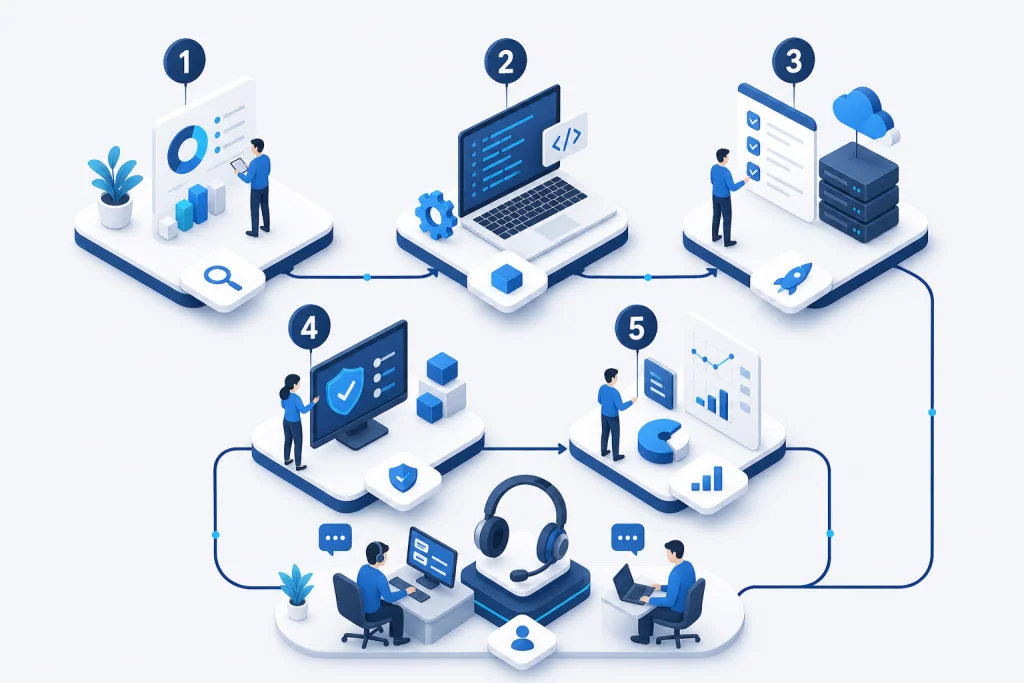
Implementation methodology follows a structured approach: (1) Needs Assessment: analyze volume, media type, integration points, and environment. (2) Solution Design: select printer model, accessories (applicator, cutter, rewinder), and software. (3) Integration: connect with ERP/WMS using APIs or middleware, test data flow. (4) Pilot Deployment: install at one location, monitor performance, and adjust settings. (5) Full Rollout: deploy across sites with training and documentation. (6) Support & Optimization: ongoing monitoring, consumables management, and firmware updates. This methodology ensures minimal disruption and maximum ROI.

Industrial Printing Solution Architecture

The architecture of an industrial printing solution comprises hardware, middleware, and software layers. Hardware includes industrial printers (e.g., Zebra ZT600 series, Honeywell PX940) with print engines, applicators, and optional RFID encoders. These printers support interfaces like Ethernet, USB, and RS-232, and can be integrated with HCI for centralized management. Middleware such as BarTender or NiceLabel provides label design, print automation, and integration with ERP/WMS via APIs or database connections. The software layer includes print servers (e.g., Printronix, LPA) that manage print queues, user authentication, and audit trails. For high-availability, enterprises deploy redundant print servers and use Synology NAS for backup of label templates and print logs. The architecture also incorporates mobile printing via Bluetooth or Wi-Fi for on-demand labels, and cloud-based management for multi-site operations. Security is ensured through encrypted communication and role-based access control, aligning with enterprise IT policies.

Industry Use Cases for Industrial Printing Solution

In logistics and warehousing, industrial printing solutions are used for shipping labels, pallet labels, and RFID tags. For example, a 3PL warehouse in Jakarta processes 50,000 parcels daily, requiring high-speed label printing with real-time integration to WMS. Industrial printers with automatic applicators apply labels to cartons at conveyor speeds up to 30 meters per minute. Barcode scanners verify label placement and data accuracy, reducing mis-shipments by 99.5%. In manufacturing, automotive parts suppliers print durable labels with QR codes for traceability, withstand oil and heat. A manufacturer in Batam uses SATO printers to label engine components, integrating with MES for real-time production tracking, achieving 100% traceability and 20% faster recall response.

How we work

Structured delivery from assessment to handover

Each phase has clear deliverables, owners, and acceptance criteria aligned to enterprise IT practice.

Approach

Industrial Printing Solution vs Traditional Alternatives

Traditional office printers (e.g., laser or inkjet) are not designed for high-volume, continuous industrial use. They have lower duty cycles (e.g., 5,000 pages per month) and slower speeds (e.g., 20 ppm), leading to frequent jams and maintenance downtime. In contrast, industrial printers have duty cycles up to 200,000 labels per month and print speeds over 12 ips, with rugged construction for 24/7 operation. They support specialized media like synthetic labels, tags, and RFID inlays, which office printers cannot handle. Additionally, industrial printers offer built-in barcode verification, RFID encoding, and connectivity to ERP systems, while office printers lack these capabilities.

  • Cost-wise, industrial printers have higher upfront cost (e.g., $3,000-$10,000) but lower total cost of ownership due to reliability and lower consumable costs per label. Office printers have lower upfront cost but higher per-label cost and more frequent replacements. For example, a logistics company switching from office printers to industrial printers reduced label waste by 40% and downtime by 80%. Furthermore, industrial printing solutions include centralized management software for monitoring and control, unlike standalone office printers. Integration with Backup & Disaster Recovery ensures label templates and print data are backed up, preventing production halts. In summary, industrial printing solutions outperform traditional alternatives in durability, speed, integration, and long-term cost efficiency for enterprise environments.

Capabilities

Case Study & Implementation Methodology

A logistics company in Jakarta faced challenges with manual labeling for 15,000 parcels daily, resulting in 5% mis-shipments and 2-hour daily delays. They implemented a Zebra ZT610 industrial printer with automatic label applicator integrated with their WMS via API. The solution included Dell servers for print management and Cisco network switches for reliable connectivity. Result: mis-shipments reduced to 0.1%, labeling time cut by 70%, and ROI achieved in 8 months. A manufacturing company in Batam producing automotive parts needed to comply with traceability regulations. They deployed SATO CL4NX printers with RFID encoding, integrated with MES on VMware infrastructure. Challenge: 3% read failure rate on RFID tags. Solution: Adjusting printer settings and antenna positioning reduced failure to 0.2%. Result: 100% traceability, 15% faster recall, and 20% reduction in inventory discrepancies. A retail company in Bandung required high-volume hang tag printing for seasonal collections. They used Honeywell PX940 printers with centralized management via BarTender. Challenge: frequent media jams due to thin tag stock. Solution: Upgraded to heavy-duty cutter and media sensor calibration. Result: 99.5% uptime, 30% faster job changes, and 25% lower consumable costs.

  • Implementation methodology follows a structured approach: (1) Needs Assessment: analyze volume, media type, integration points, and environment. (2) Solution Design: select printer model, accessories (applicator, cutter, rewinder), and software. (3) Integration: connect with ERP/WMS using APIs or middleware, test data flow. (4) Pilot Deployment: install at one location, monitor performance, and adjust settings. (5) Full Rollout: deploy across sites with training and documentation. (6) Support & Optimization: ongoing monitoring, consumables management, and firmware updates. This methodology ensures minimal disruption and maximum ROI.

Use cases

Shipping label

Product labeling

Compliance label

Warehouse batch print

Industrial Printing Solution for Enterprise

Our engineers help design, deploy, and support enterprise IT solutions across Indonesia.

Request a quote Contact our team

Related pages

E-E-A-T · Expertise & trust

Implementation expertise & enterprise trust

Intilogy (PT. Inti Jaya Teknologi) supports IT and procurement teams across Indonesia — from technical assessment and BoQ through deployment, documentation, and post go-live support.

  • 500+ Infrastructure deployments
  • 24/7 Operational support
  • SLA Enterprise SLA
  • 150+ Clients & institutions

Engineering & delivery expertise

Engineer-led assessment

Requirements workshops, sizing, and architecture — not catalogue selling without context.

Documented deployment

Commissioning checklists, as-built diagrams, IP plans, and escalation runbooks.

Audit-ready procurement

BoQ/BOM, quotations, POs, and handover packs for tenders and IT audits.

Multi-vendor coordination

One project partner for servers, networks, security, backup, and licensing.

Vendor ecosystem & sourcing channels

We source through official distributors/resellers per brand and project. Specific partnership tiers are confirmed per RFP — see our credentials page.

Vendor Status / tier Scope Notes
Dell Technologies Authorized channel PowerEdge, storage BoQ & manufacturer warranty
HPE Authorized channel ProLiant Enterprise servers
Fortinet Implementation partner NGFW, SD-WAN Licensing & deployment
Veeam Implementation partner Backup, replication Immutable design
VMware Implementation partner vSphere Cluster & migration

Tiers vary by SKU/region. Contact sales@intilogy.com for distributor letters or engineer certificates.

Enterprise implementation methodology

Standard flow for infrastructure, security, and backup projects — scoped per contract.

  1. Discovery & assessment

    Duration: 1–2 weeks

    Deliverables Requirements & risk report

  2. Architecture & BoQ

    Duration: 1–2 weeks

    Deliverables HLD, BoQ, rollout plan

  3. Procurement & staging

    Duration: 2–4 weeks

    Deliverables Asset register

  4. Implementation & UAT

    Duration: 2–6 weeks

    Deliverables As-built, UAT sign-off

  5. Handover & operations

    Duration: Ongoing

    Deliverables SOPs, training, SLA if contracted

Support & SLA (per project contract)

Service levels are defined in agreement — example framework below.

Standard maintenance

Response
Next business day (remote)
Coverage
Firmware advisory, tickets, RMA
Notes
Indonesia business hours

Project warranty

Response
Per implementation contract
Coverage
Defects in Intilogy deployment scope
Notes
Not 24/7 unless agreed

Critical incident (optional)

Response
4–8 hours if contracted
Coverage
Production-critical escalation
Notes
Requires separate MSA

Response times are illustrative — binding only when written in contract.

Technical documentation delivered

  • Topology & rack diagrams (as-built)
  • Asset list, serials, warranty status
  • Critical config summary & change log
  • Basic operations runbook & escalation contacts
  • Restore / DR drill reports (if in scope)
  • Tender packs: distributor letters & engineer certs (on request)

Competency & certifications

Engineers train on vendor technologies per project. Individual certs (Fortinet NSE, VMware VCP, Veeam VMCE, etc.) are provided for tenders — not all listed publicly.

  • Engineer certifications — Per project technology — on request
  • Distributor letters — For procurement audit
  • Client references — See Clients page for logos & scope

View certifications & partnerships

Ready to discuss architecture & BoQ?

Our team supports assessment, recommendations, procurement, and documented implementation.

WhatsApp Consult on WhatsApp
Request Consultation WhatsApp